

HorizonTech Charging Problems: Common Causes and How to Fix Them
HorizonTech Charging Problems: Common Causes and How to Fix Them
Modern disposable vape devices are more advanced than ever before. With features like:
- USB-C fast charging,
- rechargeable batteries,
- smart displays,
- and ultra-high puff capacity,
devices such as HorizonTech disposable vapes are built for long-lasting performance and convenience.
However, like any rechargeable electronic device, users may occasionally experience charging-related issues.
The good news is:
Most HorizonTech charging problems are minor and can be solved quickly with simple troubleshooting steps.
In this guide, we’ll explain the most common HorizonTech charging issues, what causes them, and how to fix them safely.
Why Modern Disposable Vapes Need Rechargeable Technology
Older disposable vapes were not rechargeable. Once the battery died, the entire device had to be replaced — even if e-liquid remained inside.
Modern HorizonTech disposable vapes use rechargeable USB-C technology to:
- extend device lifespan,
- support ultra-high puff counts,
- maintain stable vapor production,
- and maximize e-liquid usage.
Rechargeable systems dramatically improve overall efficiency and value.
However, charging systems must function properly to maintain consistent performance.
Common HorizonTech Charging Problems
Some users may occasionally encounter issues such as:
- device not charging,
- slow charging,
- blinking lights during charging,
- inconsistent battery percentage,
- or charging interruption.
Most of these issues are caused by:
- cable problems,
- charging port debris,
- incompatible power sources,
- or temporary battery protection systems.
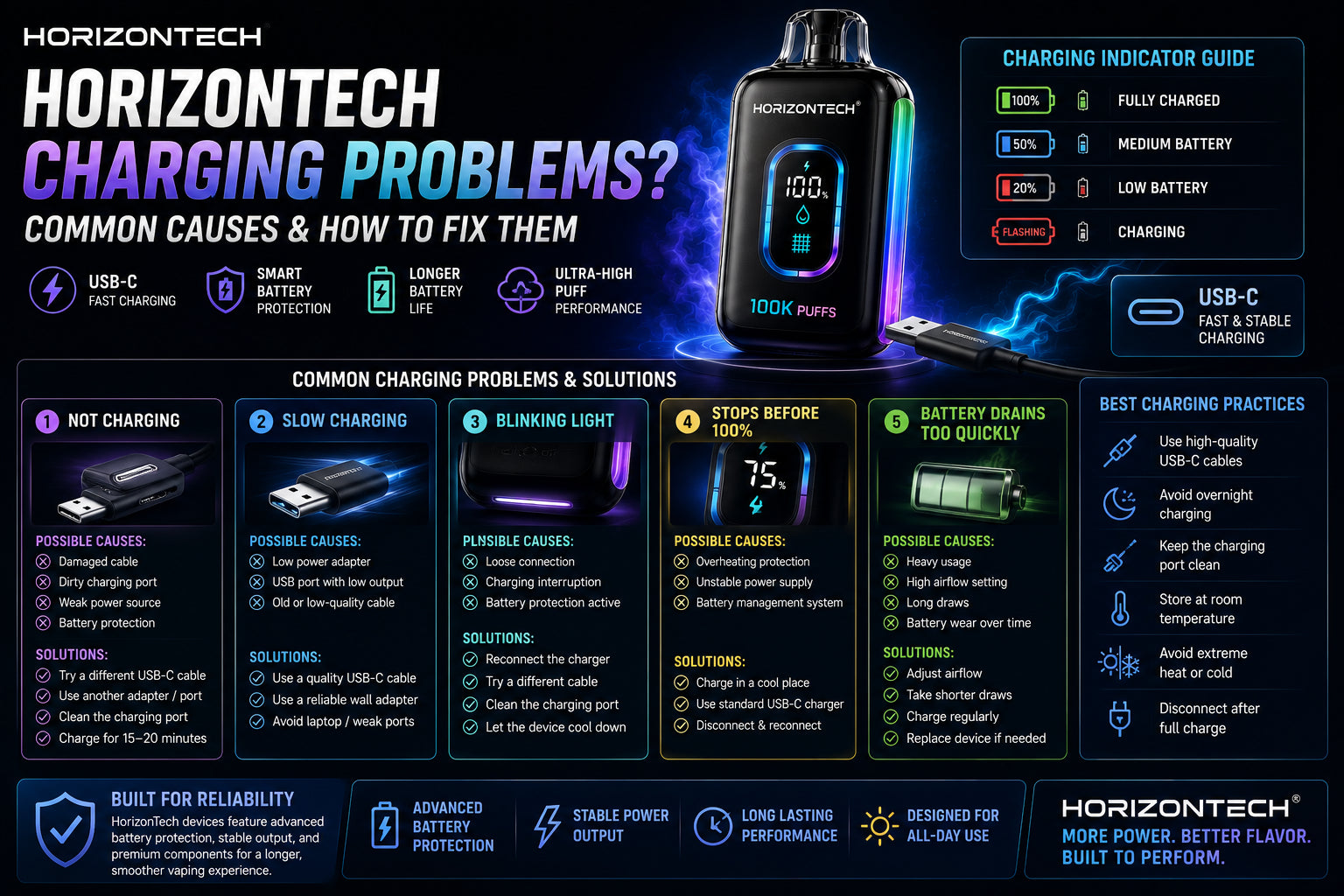
1. HorizonTech Vape Not Charging
Possible Causes
The most common reasons include:
- damaged USB-C cable,
- dirty charging port,
- weak power adapter,
- or internal battery protection activation.
How to Fix It
Try the following steps:
- Use a different USB-C charging cable
- Try another wall adapter or USB port
- Inspect the charging port for dust or debris
- Allow the device to charge for at least 15–20 minutes
- Avoid fast-charging adapters with excessive voltage output
In many cases, changing the cable solves the issue immediately.
2. Slow Charging Problems
Why It Happens
Slow charging may occur when:
- using low-power USB ports,
- using older charging adapters,
- or charging through laptops with limited power output.
Recommended Solution
For best performance:
- use a quality USB-C cable,
- use a reliable wall adapter,
- and avoid unstable charging sources.
HorizonTech rechargeable devices are optimized for stable USB-C charging systems.
3. Blinking Light While Charging
Many HorizonTech devices use LED indicators or smart displays to communicate battery status.
A blinking light may indicate:
- active charging,
- low battery protection,
- or charging interruption.
What To Do
- Disconnect and reconnect the charger
- Try a different charging cable
- Check for debris inside the charging port
- Allow the battery to cool before charging again
If the device continues blinking abnormally after troubleshooting, the battery may require replacement.
4. Device Stops Charging Before Reaching 100%
This issue can happen due to:
- overheating protection,
- unstable power supply,
- or battery management systems regulating voltage.
Solution
- Avoid charging in hot environments
- Use standard USB-C chargers only
- Remove the device from direct sunlight
- Allow the device to cool before charging again
Modern HorizonTech devices include battery protection systems designed to prevent overheating and extend battery lifespan.
5. Charging Port Problems
Charging port issues may develop from:
- pocket lint,
- dust buildup,
- moisture exposure,
- or accidental physical damage.
How to Clean the Port Safely
Use:
- compressed air,
- a soft dry brush,
- or a wooden toothpick carefully.
Never:
- use metal tools,
- apply liquid cleaners,
- or force objects into the charging port.
Proper charging port maintenance helps preserve charging reliability over time.
6. Battery Drains Too Quickly
If your HorizonTech device loses power unusually fast, possible causes include:
- extremely frequent usage,
- high airflow settings,
- long draw duration,
- or battery wear after extended use.
Higher vapor production naturally consumes more battery power.
Devices with:
- mesh coils,
- large displays,
- and ultra-high puff capacity
may also require more frequent charging compared to smaller disposables.
Best Charging Practices for HorizonTech Devices
To maintain optimal battery performance:
Recommended Tips
- Use high-quality USB-C cables
- Avoid overnight charging
- Keep the charging port clean
- Store devices at room temperature
- Avoid extreme heat or cold
- Disconnect after full charge
- Use stable wall adapters instead of cheap power sources
Proper charging habits help extend:
- battery lifespan,
- device consistency,
- and long-term vape performance.
Why HorizonTech Charging Systems Perform Better
HorizonTech rechargeable disposable vapes are engineered with:
- advanced battery management systems,
- stable voltage regulation,
- USB-C fast charging support,
- and optimized power efficiency.
Compared to older disposable vape devices, HorizonTech systems provide:
- faster charging,
- stronger battery consistency,
- longer-lasting performance,
- and more reliable daily usage.
When Should You Replace the Device?
Even rechargeable disposable vapes eventually reach the end of their usable lifespan.
You may need a replacement if:
- the device no longer charges after troubleshooting,
- vapor production becomes extremely weak,
- charging becomes inconsistent,
- or flavor quality drops significantly.
Most high-puff disposable devices are designed for extended use, but long-term wear eventually affects battery and coil performance.
Explore HorizonTech Rechargeable Disposable Vapes
Discover advanced disposable vape technology with:
- USB-C fast charging,
- premium mesh coil systems,
- optimized airflow,
- and ultra-high puff performance.
Browse the latest HorizonTech disposable vape collection today.